ESL Support in ReadnQuiz
If English is not a student's native language, reading the book is hard enough. The quiz should not be the difficult part.
The purpose of the quiz is to find out whether the student read and understood the book. The quiz should not be an obstacle to that goal. It should be easy to read, easy to understand, and easy for the student to demonstrate comprehension of the book -- not the quiz.
ReadnQuiz offers ESL students native language translations of quiz questions. We like to call them subtitles. More than 60 languages are supported.
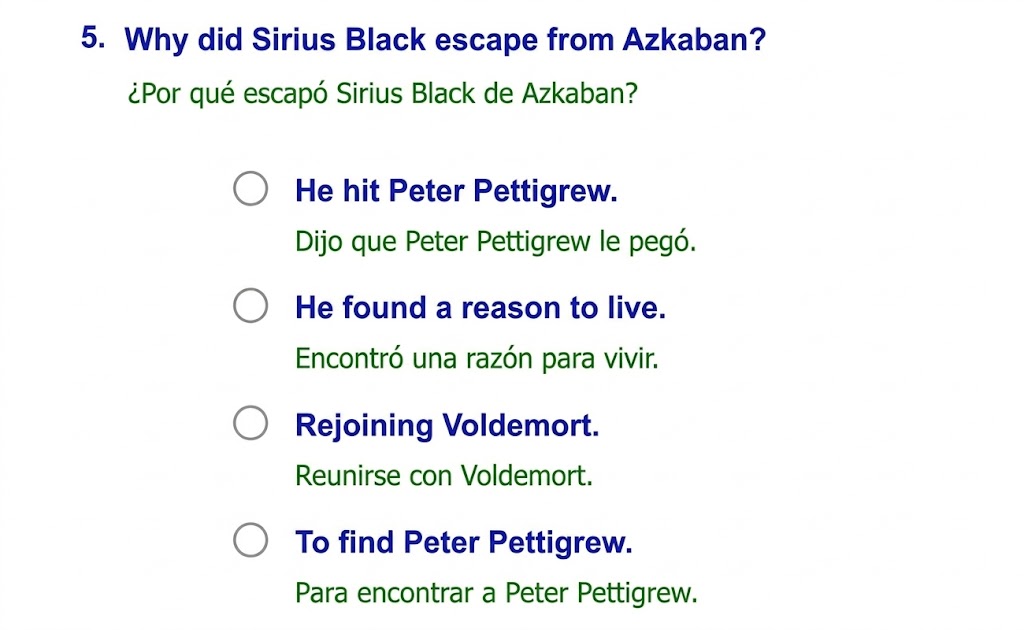
If the student is an early reader, even their own native language may be difficult to read. Add Read Aloud in the student's primary language to make it even more accessible.
How to Enable ESL Translation Support
- Click Students or Manage Students from the menu.
- Open the student's account page.
- Click Edit Student under the student's information.
- Select a Primary Language other than English.
- Click Save.
- Click Settings.
- Set Bilingual (Subtitles) to Yes.
- Click Save.
Setting Read Aloud for Language Translation
- Go to the student's account page.
- Click Settings.
- Set Read Aloud to Yes.
- Click Save.
When both Bilingual and Read Aloud are enabled, the text-to-speech will read the translated text in the student's primary language.
Questions? Contact Us